
Operator console
run the app without code.
A small Node server you host yourself. It serves the MIKODES Admin Kit console at /admin, writes the app's settings to Firestore and gives you pages for users, ledger, fraud flags, leaderboard, quizzes, tasks, offers and push.
01What the console does
- Settings → Firestore. The console is the source of truth for the app's configuration. On every save, and once at start, it writes
config/public(read by the app) andconfig/private(read only by Cloud Functions). - Server-side access only. It uses the Firebase Admin SDK on the server. The browser never talks to Firestore.
- Every write is audited in an append-only audit log: who changed what, and why.
- Roles. Viewers read, managers write, only owners create or rotate offer secrets and change secret settings.
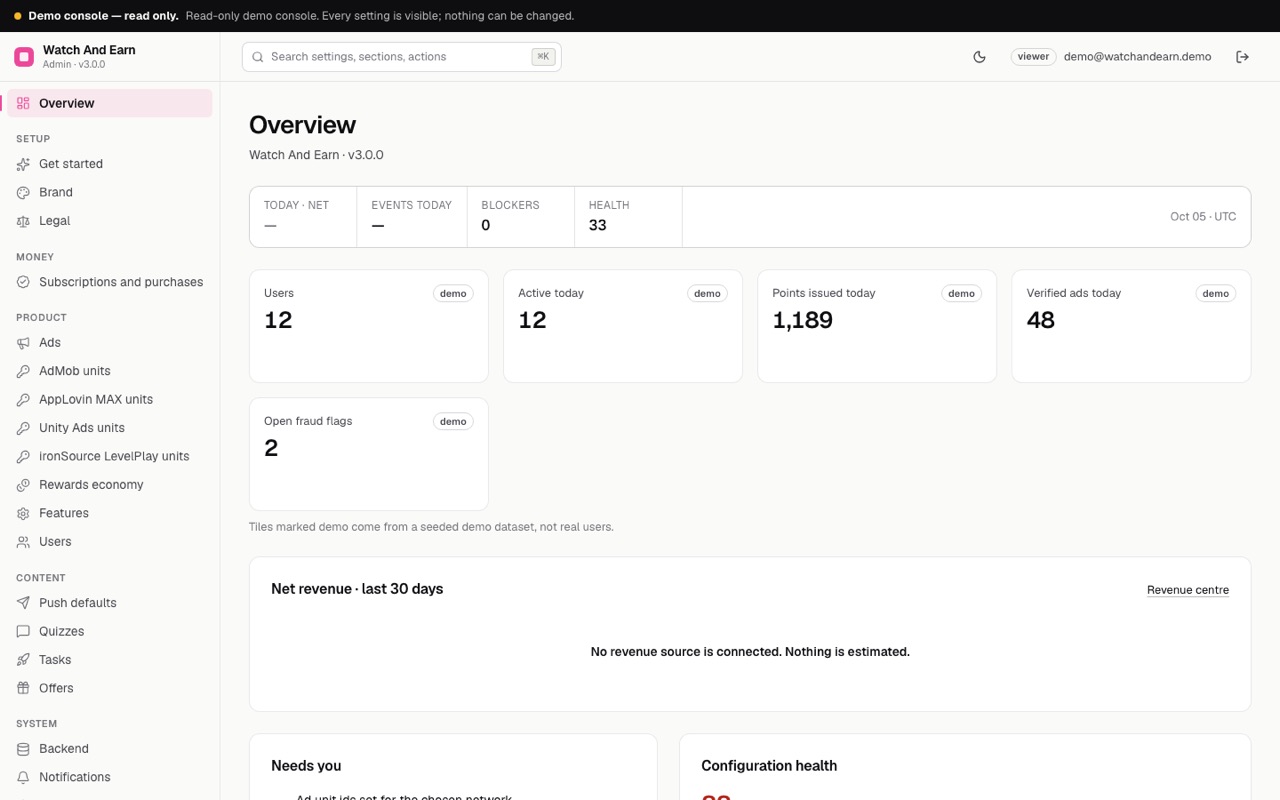
- Real counts, no estimates. The Overview shows users, active today, points issued today, verified ads today and open fraud flags, counted from Firestore. Ad-network and store revenue stay in those dashboards; the console shows revenue as unavailable instead of guessing.
02Environment variables
Copy admin/.env.example to admin/.env (never commit it) or set these in your host's environment.
| Variable | Purpose | Where to get it |
|---|---|---|
ADMIN_SECRET_KEY Required | Encrypts the secrets the console stores (ad network keys, the Apple .p8 key). | Generate: openssl rand -hex 32. Back it up. Without it the stored secrets cannot be read. If it is missing, the console generates one in data/.admin-secret-key and warns in the log; move it into your environment. |
GOOGLE_APPLICATION_CREDENTIALS | Path to a service-account key file of your Firebase project. | Firebase console → Project settings → Service accounts → Generate new private key. Leave empty on Cloud Run or GCE to use the attached service account. |
FIREBASE_PROJECT_ID | Optional. Set it when the credentials do not name the project. | Your project id. |
FIRESTORE_EMULATOR_HOST | Local development only: use the Firestore emulator, e.g. 127.0.0.1:8080, with no credentials. | — |
ADMIN_DATA | sample = built-in sample data and no Firebase (public demo). Empty = Firestore. | Leave empty on your install. |
ADMIN_DEMO_PASSWORD | Only on a public demo host: makes the console a read-only demo (account demo@watchandearn.demo). | Leave empty on your install. |
PORT | HTTP port. | Default 8790. |
DATABASE_URL | Optional Postgres for the console's own data (team, sessions, settings, audit) instead of data/admin.sqlite. | Neon, Supabase, Cloud SQL… Use a pooled URL with sslmode=require. |
Keep its key file on the console's server only. Never put it in the app, in git or in a support message.
03Run it and create the owner
cd admin
npm ci
cp .env.example .env   # fill in ADMIN_SECRET_KEY and GOOGLE_APPLICATION_CREDENTIALS
npm start # http://localhost:8790/admin- Find the setup codeOn first start the log prints a one-time setup code. Each start before an owner exists prints a new one; any printed code works.
- Create the ownerOpen
/admin, choose Create the owner, enter the code, your e-mail and a password of 12 or more characters. - Add your teamUnder Team, add managers and viewers.
Compiled build instead of tsx: npm run build && npm run start:dist.
04Deploy options
| Where | How |
|---|---|
| Any Node 22 host (VPS, Render, Railway, Fly) | npm ci && npm start. Data lives in data/admin.sqlite: put data/ on a persistent disk, back it up together with ADMIN_SECRET_KEY, and run one instance. |
| Docker | See below. The volume keeps /app/data. |
| Serverless or several instances (Cloud Run with autoscaling) | Set DATABASE_URL to Postgres; tables are named mk_watchandearn_*. Give the service account the Firebase Admin SDK Administrator Service Agent role (or Cloud Datastore User plus Firebase Cloud Messaging Admin) and leave GOOGLE_APPLICATION_CREDENTIALS empty. |
cd admin
docker build -t watchandearn-admin .
docker run -p 8790:8790 -v wae-admin-data:/app/data --env-file .env watchandearn-admin
Put HTTPS in front of it (a reverse proxy or the platform's TLS). The session cookie is marked Secure over HTTPS and the server honours x-forwarded-proto.
05Settings sections
In the order of the sidebar. The Get started and Status screens show what is still missing.
| Section | What you set |
|---|---|
| Brand | Product name (default "Watch And Earn"), accent colour (default #EC4899), support e-mail, and the name of the points (default "points", e.g. coins or stars). |
| Legal | Terms of service URL, privacy policy URL, rewards rules URL, and the points notice shown under every balance. The Status page warns while privacy and terms are empty. |
| Subscriptions and purchases | VIP and remove-ads, off by default. See In-app purchases. |
| Ads | Ad network, interstitial pacing, home banner. See Ads. |
| AdMob / AppLovin MAX / Unity Ads / ironSource LevelPlay units | Unit ids and app keys per network, and that network's verification secret. |
| Rewards economy | Points, caps, wheel, scratch prizes, quizzes, referrals, levels, VIP multiplier. See Rewards economy. |
| Features | Switch the wheel, scratch cards, quizzes, tasks, offers, leaderboard, invites and streak on or off. |
| Push defaults | Default title and message for the Push page. |
| Backend | Cloud Functions base URL, e.g. https://us-central1-<project-id>.cloudfunctions.net. The console uses it to show the exact callback and postback URLs. |
| Notifications | An e-mail and a signed webhook for alerts when a blocking check starts failing. |
Kit screens beside these: Overview, Status, Team, Audit log, History and Export.
06Product pages
Users
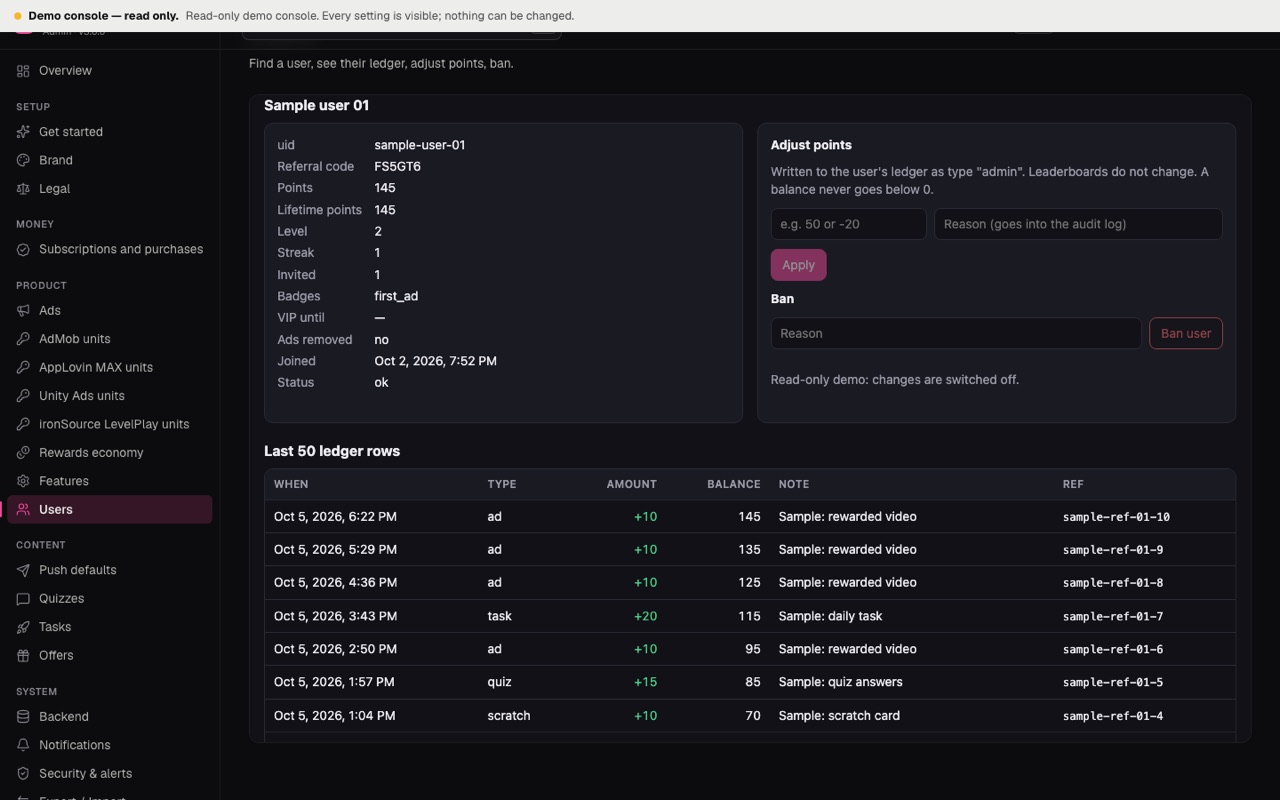
Search by uid, display name (starts with) or referral code. Open a profile to see the last 50 ledger rows. Adjust points with a mandatory reason: the ledger row has type admin, leaderboards do not change, and a deduction can never take the balance below 0. Ban and unban: a banned user is refused by every function except account deletion.
Ledger
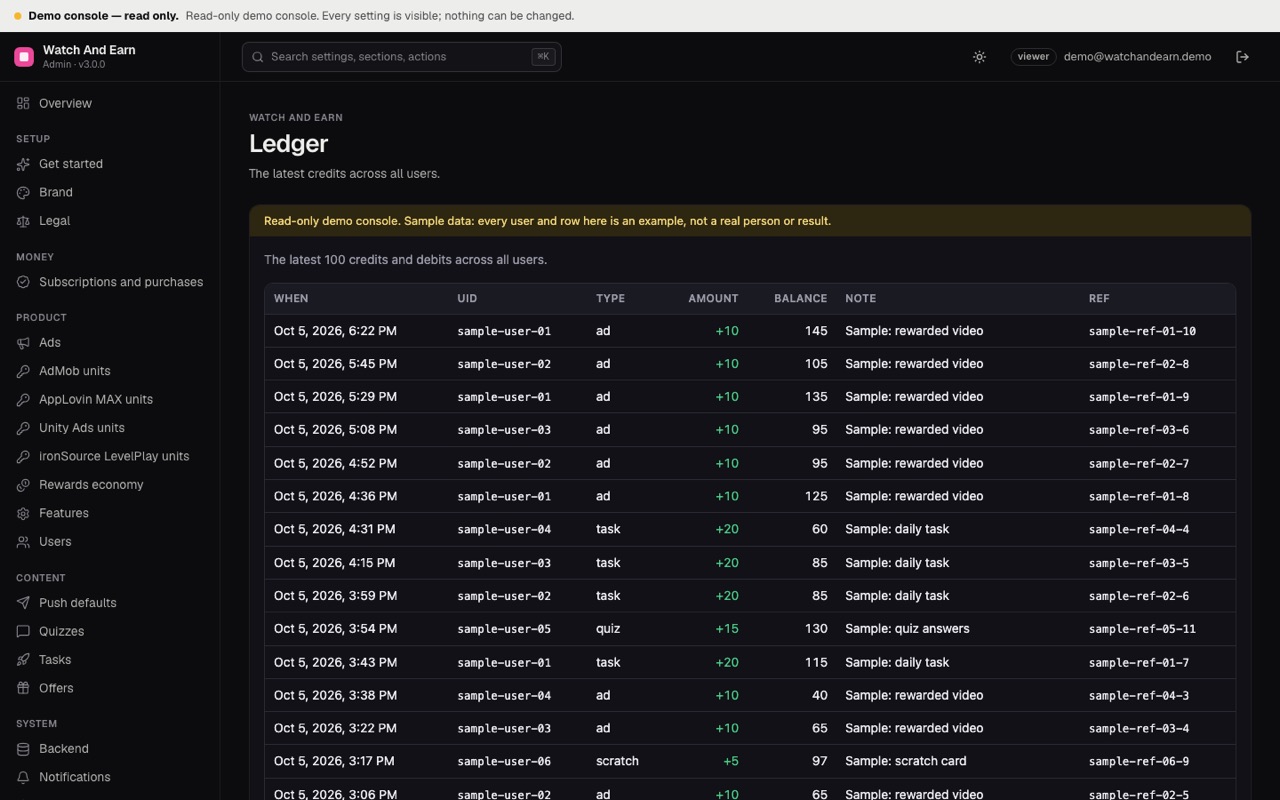
The latest credits across all users: type, amount, balance after, note.
Fraud flags
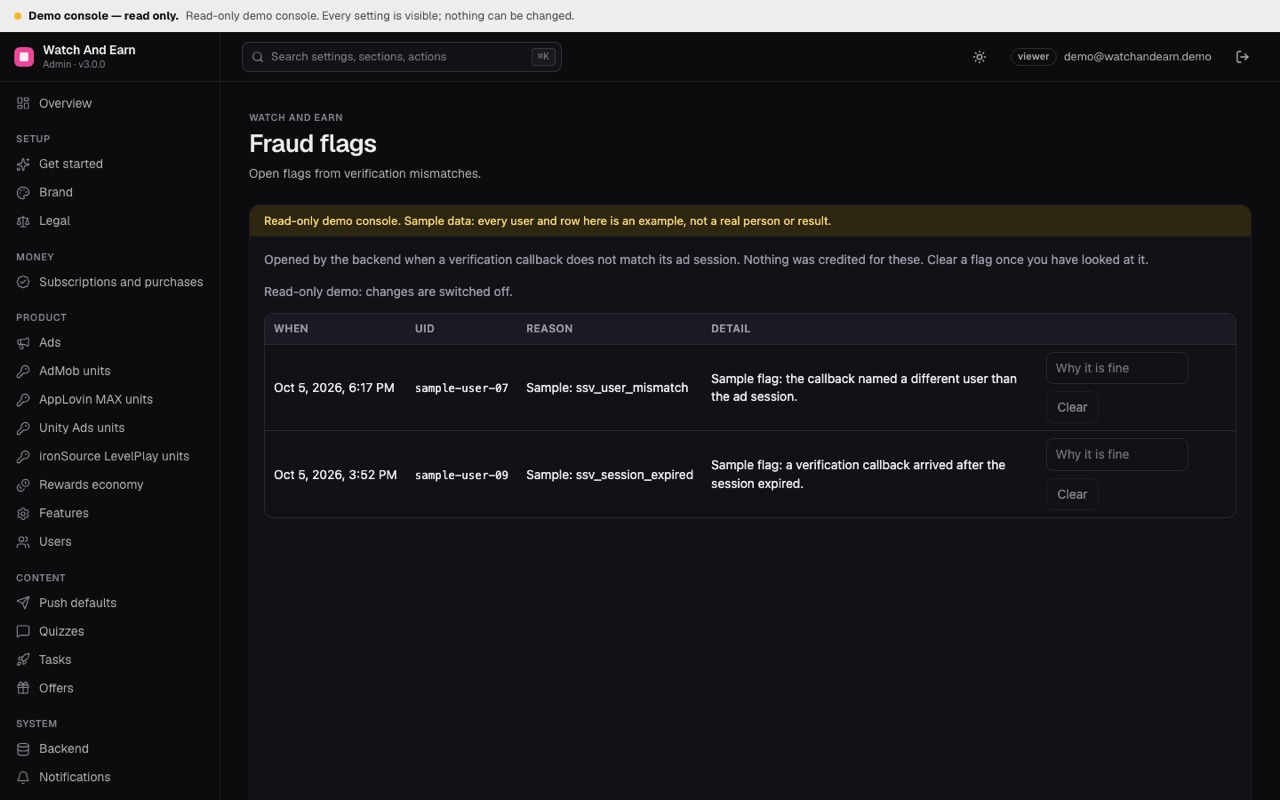
Open flags from verification mismatches, for example a callback for another user's session or an expired one. Review and clear with a reason; the user's flagged mark is removed when no other open flag remains.
Leaderboard
Today, this week and all time.
Quizzes
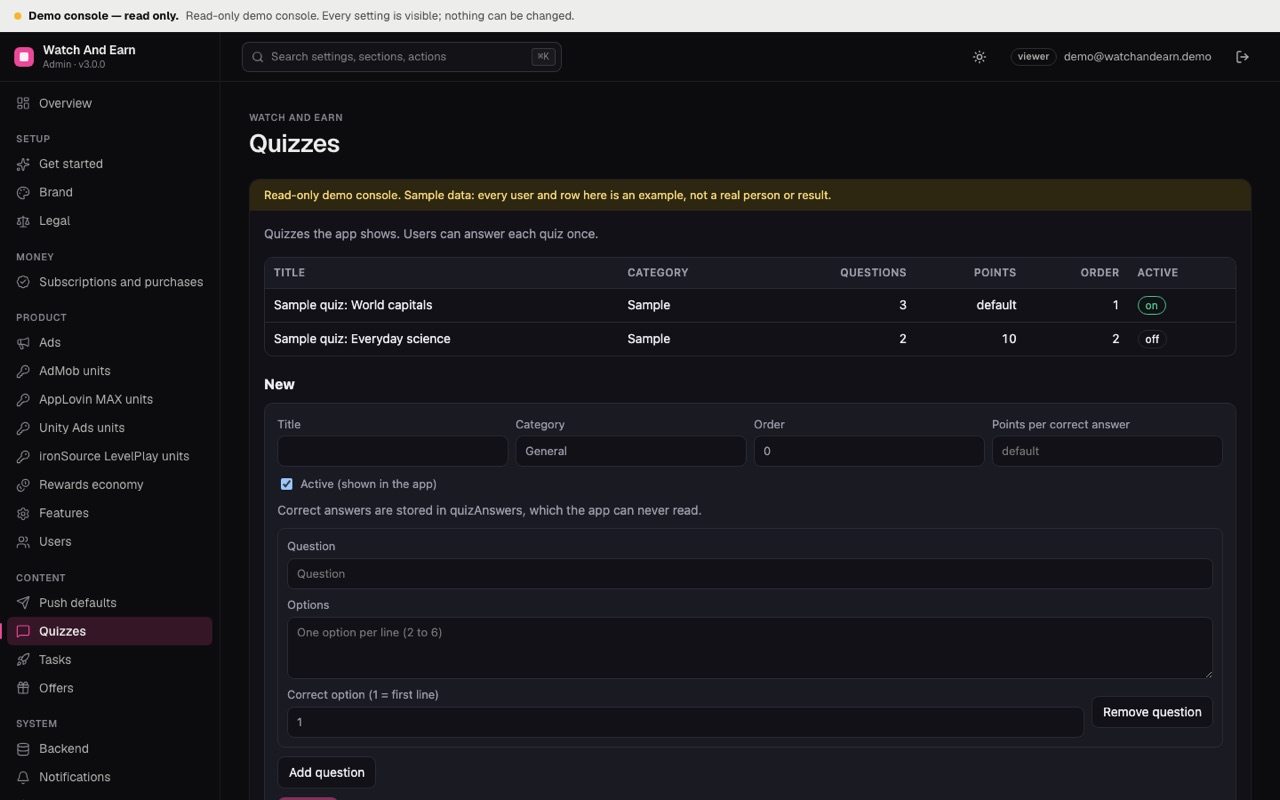
Create and edit quizzes with a title, category, order, optional points per correct answer and questions with options. Correct answers are stored separately in quizAnswers, which the app can never read.
Tasks
Daily tasks with a type (ads, spins, scratches, quizzes, offers, streak or points), a target count and points. Progress is computed on the server from today's counters; each task can be claimed once per UTC day.
Offers
Partner offers with title, description, URL, points, partner and optional image. Each offer gets a postback secret, shown once. See Partner offers.
Push
Send a notification to every device subscribed to the topic all. Managers and owners only. See Push.
07Public read-only demo console
To show the console to others without Firebase, run a separate instance with ADMIN_DATA=sample and ADMIN_DEMO_PASSWORD=<a password you publish>. Visitors sign in as demo@watchandearn.demo, a viewer. No owner exists, every write answers 403, every row is labelled "Sample" and the Overview tiles are marked "demo". Never set these two variables on your real console.